
Instagram Reel Thumbnail Size, Aspect Ratio and Safe Zone
Meta's only official Reel cover size, why 1080 × 1920 works better, what the 3:4 grid and Reels tab cut off, and where faces and text stay safe.
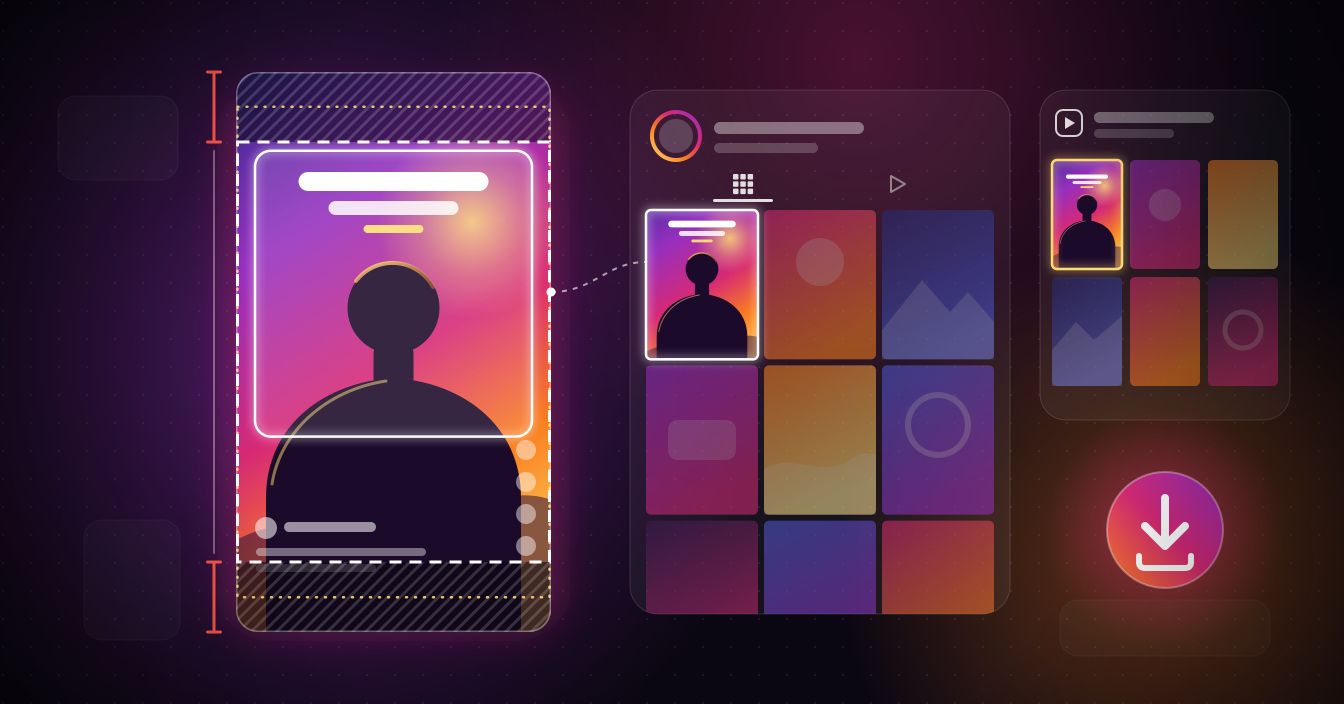
The Instagram Reel thumbnail size that works best is 1080 × 1920 pixels, a full 9:16 frame, yet almost nobody sees all of it: the profile grid shows a 3:4 slice, the Reels tab a slightly taller one, and the player lays the caption and buttons across the bottom. Below are the figures Meta actually publishes, what each view cuts off, where faces and text stay safe, and how to see the full cover of any public Reel with the Instagram thumbnail downloader.
What size is an Instagram Reel thumbnail?
Meta publishes one cover figure. Instagram's Reel size page recommends a cover of 420 × 654 pixels, a 1:1.55 ratio, saved as JPG or PNG. The same page says a Reel itself can be anything from 1.91:1 landscape to 9:16 portrait, with a minimum resolution of 720 pixels.
Treat 420 × 654 as a shape rather than an export size. It matches the tall tiles in a profile's Reels tab almost exactly (on instagram.com they measure 1:1.56), but the cover is also the still Instagram shows before a Reel starts playing, and that still fills a phone screen far wider than 420 pixels. Stretched that far, a small cover turns soft.
Meta doesn't publish a full-size cover spec for organic Reels, so the working figure is 1080 × 1920, for three reasons. It's the 9:16 shape every Reel view is built around, 1,080 pixels is the widest Instagram stores photos, and Meta's current feed video spec lists exactly 1080 × 1920 for 9:16. Design at that size and each crop below is simply a slice of your image.
Reel thumbnail aspect ratio: how each view crops the cover
Here's what a 1080 × 1920 cover loses in each view. Where Meta doesn't publish the shape, the figure comes from measuring Instagram's own layout.
| Where the cover appears | Shape shown | Where the figure comes from | What a 1080 × 1920 cover loses |
|---|---|---|---|
| Full-screen player | The whole 9:16 frame | Meta's Reel size page | Nothing is cut, but the caption, username and buttons cover the bottom and right edge |
| Profile grid | 3:4 tile from the centre | Measured on instagram.com; matches Meta's 1080 × 1440 photo limit | About 240 px at the top and 240 px at the bottom |
| Reels tab | 1:1.55 tile | Meta's 420 × 654 cover figure | About 240 px of height in total, split between top and bottom |
| Home feed | The whole 9:16 frame | Meta's feed video spec (1080 × 1920) | No fixed crop; plan for the same margins as the player |
Profile grid: a 3:4 slice from the middle
The grid stopped being square in early 2025. Tiles are now 3:4, and on instagram.com a Reel's tile loads the full 9:16 cover and displays its centre. Meta doesn't publish a pixel size for grid tiles, but its photo page caps posts at 3:4 (1080 × 1440), the same shape. Cut 3:4 out of a 1080 × 1920 cover and the middle 1,440 pixels remain: 240 disappear off the top and 240 off the bottom. Any size guide still quoting a square grid crop is describing the old layout.
Reels tab: a little more survives
The Reels tab on a profile uses taller tiles, and this is where Meta's 1:1.55 figure fits. At that shape a 1,080-pixel-wide cover shows about 1,680 pixels of its height, so only a thin strip goes at each end. Anything that survives the grid survives here as well.
Full-screen player: nothing cut, plenty covered
The player shows the whole frame, but not all of it stays clear. The username, caption and audio label sit along the bottom, and the like, comment and share buttons stack down the right side. Meta only puts numbers on this in its Reels ads guide: leave at least 14% of the top, 35% of the bottom and 6% of each side free of text and logos. On a 1080 × 1920 frame that's roughly 270 pixels at the top, 670 at the bottom and 65 at each side.
Home feed: don't design for a 4:5 cut
Plenty of older guides say the feed trims Reels to 4:5. Meta's current pages don't describe that for 9:16 video: the feed video spec is the full 1080 × 1920, and Meta's safe-zone page applies the Reels margins to 9:16 feed ads. Meta doesn't document the organic feed layout further, so plan for the full frame with the player's margins.
The Reel thumbnail safe zone: where faces and text survive
Stack the grid crop on the player margins and one band remains that shows everywhere. On a 1080 × 1920 cover, keep faces, headlines and logos between roughly 270 and 1,250 pixels from the top, and at least 65 pixels in from either side. The top line is Meta's 14% margin, which also clears the grid's 240-pixel trim; the bottom line is where Meta's 35% bottom margin begins, well above the grid's lower cut at 1,680 pixels.
- 0–240 px: cut from the grid tile. Background only.
- 240–270 px: visible in the grid but inside Meta's top margin for the player. Keep it clear.
- 270–1,250 px: the safe core, seen in every view. Faces and headline text go here.
- 1,250–1,680 px: visible in the grid but under the caption and buttons in the player. Fine for shoulders or scenery, not for words.
- 1,680–1,920 px: cut from the grid and covered in the player. Background only.
Four rules that keep a cover readable
- Centre the face, with the eyes a little above the middle of the frame. A face parked near the top loses its forehead in the grid.
- Keep the headline to a few words in the upper half of the safe core, large enough to read on a tile a third of the screen wide.
- Keep text out of the lower-right corner, where the action buttons sit in the player.
- If the cover is a frame from the video, choose one where the subject is centred and still, not caught mid-movement.
How to view and save a Reel thumbnail
The quickest way to audit a cover is to look at the whole thing, uncropped. The Instagram thumbnail downloader works as a viewer and a saver in one: it fetches the cover image of a public Reel at the resolution Instagram serves, shows it to you, and lets you keep it.
- Open the Reel, tap the share icon and choose Copy link, or copy the instagram.com/reel/… address from your browser.
- Paste it into the thumbnail downloader and press Get cover.
- Save the image when it appears.
iPhone (Safari)
There's no iOS app, and you don't need one. In Safari the image saves into Files through the share sheet; open Files, tap the image and choose Save Image to move it into Photos.
Android and computers
In Chrome on Android, and in any desktop browser, the image lands in your Downloads folder.
What you get back
The file is the poster frame itself, not a screenshot and not the grid tile, so you can lay a 3:4 crop over it and see exactly what the grid hides. It can't be sharper than the copy Instagram stored; no tool can recover detail the platform never kept. It only works on public Reels: private accounts share media with approved followers only, and the tool doesn't try to get around that. If a cover belongs to someone else, use it for reference and ask the creator before reposting it. For a device-by-device walkthrough, see our guide to downloading an Instagram Reel thumbnail.
Why does a saved cover look different from the grid?
Saved covers often look taller and emptier than the tile people remember. Nothing went wrong: the grid only ever showed the middle three-quarters, so the saved file includes a band at the top and bottom you never saw there. A headline that looked clipped at the top of the tile was straddling the grid's crop line; in the saved file it's whole.
If a saved cover looks soft next to the video, it was probably grabbed from a compressed video frame or uploaded small. Meta's own recommended size is only 420 pixels wide, and a cover can't carry more detail than Instagram stored.
Audit your own covers before the next post
Ten minutes shows whether your covers survive the crops:
- Save the covers of your last six to nine Reels.
- Crop each one to 3:4 from the centre in your phone's photo editor, the same slice the grid shows.
- Look for foreheads, headlines or logos cut at the top or bottom, and for text that would sit under the caption in the player.
Build the next cover at 1080 × 1920 with guides at 270 and 1,250 pixels, and it will read the same in the grid, the Reels tab and the player. If an existing cover fails the test, look for a cover option in the Reel's Edit menu. Instagram's help page says covers can't be changed after upload, so if the option isn't there, fix it on the next Reel.
See the full cover of any public Reel
Paste a public Reel link into the Instagram thumbnail downloader to see its whole cover in seconds, free and with no sign-up. Want the clip itself? The Instagram Reels downloader saves the video, and the Instagram photo downloader handles photo posts and carousels.
FAQ
Keep reading
All posts →Download Snapchat Story Videos From a Public Link (2026)
Copy a public Story's link, paste it, and save each snap as an MP4 with sound. Steps for iPhone and Android, real quality, and why links expire.
Can You Download Snapchat Videos in HD? The Honest Answer
A Snapchat download is the exact file Snapchat serves, and we measured public Stories at 480 × 852. Why it isn't 1080p, and what helps.
How to Save Public Facebook Videos to Your Phone in HD (2026)
Facebook has no built-in download button, but saving public videos to your phone in HD takes under a minute. Here's exactly how to do it on iPhone and Android — free, no signup needed.